---
title: How to check your leads
description: When potential customers are interested in one of your properties, they can contact you by by filling out the form on our website. Once their request is sent, you’ll receive a notification containing
---
[Skip to content](https://help.properstar.com/knowledge/how-to-check-your-leads#main-content)
- [English](https://help.properstar.com/knowledge/how-to-check-your-leads)
- [Deutsch](https://help.properstar.com/de/knowledge/wie-sie-ihre-anfragen-überprüfen-können)
- [Español](https://help.properstar.com/es/knowledge/how-to-check-your-leads)
- [Français](https://help.properstar.com/fr/knowledge/how-to-check-your-leads)
- [Italiano](https://help.properstar.com/it/knowledge/how-to-check-your-leads)
- [Português - Portugal](https://help.properstar.com/pt-pt/knowledge/how-to-check-your-leads)
English
Show submenu for translations
[](https://dashboard.properstar.com/)
- [Agent Dashboard](https://dashboard.properstar.com/)
- [Properstar](https://www.properstar.com/)
- [Blog](https://blog.properstar.com/en)
- [Contact us](https://dashboard.properstar.com/contact)
Open main navigation
Close main navigation
- [Agent Dashboard](https://dashboard.properstar.com/)
- [Properstar](https://www.properstar.com/)
- [Blog](https://blog.properstar.com/en)
- [Contact us](https://dashboard.properstar.com/contact)
- - [English](https://help.properstar.com/knowledge/how-to-check-your-leads)
- [Deutsch](https://help.properstar.com/de/knowledge/wie-sie-ihre-anfragen-überprüfen-können)
- [Español](https://help.properstar.com/es/knowledge/how-to-check-your-leads)
- [Français](https://help.properstar.com/fr/knowledge/how-to-check-your-leads)
- [Italiano](https://help.properstar.com/it/knowledge/how-to-check-your-leads)
- [Português - Portugal](https://help.properstar.com/pt-pt/knowledge/how-to-check-your-leads)
English
Show submenu for translations
How can we help you?
- There are no suggestions because the search field is empty.
1. [Help Center](https://help.properstar.com/knowledge?hsLang=en)
2. [Manage your leads](https://help.properstar.com/knowledge/manage-your-leads?hsLang=en)
# How to check your leads
### From your own email client or in your CRM
When potential customers are interested in one of your properties, they can contact you by by filling out the form on our website. Once their request is sent, you’ll receive a notification containing all the details provided by the customer. This message is what we call a “lead”.
Depending on your account configuration, leads can be delivered by email from *noreply@properstar.com* or directly to your CRM via technical integration. To see where the leads for your listings are being delivered, scroll to the bottom of the "Details" page for the specific listing you're reviewing. The "Lead recipients" section contains the necessary information.
⚠️ Please note that lead emails can be rejected or fall into Spam/Junk folder, so make sure to whitelist all messages from *noreply@properstar.com*.
### From Properstar Dashboard
In addition, all your leads are accessible and manageable through our dashboard interface. To view your leads, simply [log in](https://dashboard.properstar.com/) and click on the [Messages tab](https://dashboard.properstar.com/messages/) from our main navigation.
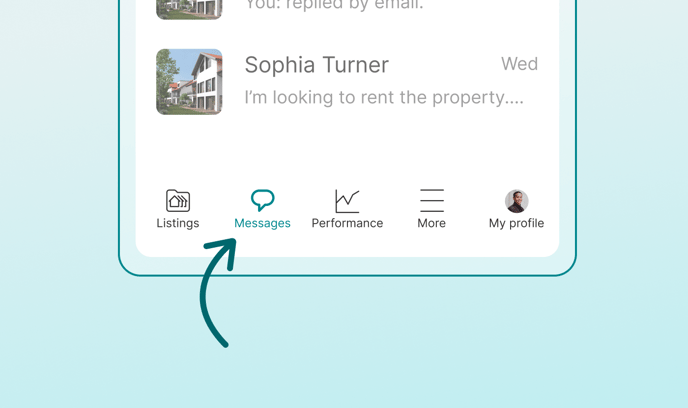
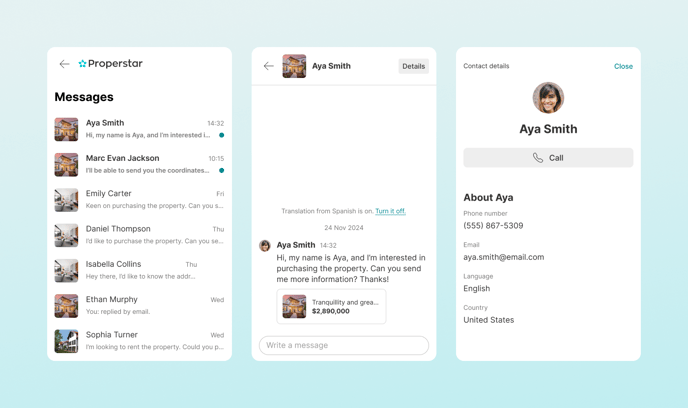
In that page, you’ll be able to see all your leads, see their contact information and directly reply from there.
All leads go through anti-spam and anti-bot checks before you receive them. We aim to deliver only qualified leads, so some machine checks are performed before forwarding a lead to you.
In case you need any help or additional information, feel free to [contact us](https://dashboard.properstar.com/contact).
- [Manage your Properstar Account](https://help.properstar.com/knowledge/manage-your-properstar-account?hsLang=en)
- [Manage your listings](https://help.properstar.com/knowledge/manage-your-listings?hsLang=en#main-content)
- [Listing details](https://help.properstar.com/knowledge/manage-your-listings?hsLang=en#listing-details)
- [Listing publication](https://help.properstar.com/knowledge/manage-your-listings?hsLang=en#listing-publication)
- [Manage your subscription](https://help.properstar.com/knowledge/manage-your-subscription?hsLang=en)
- [Manage your leads](https://help.properstar.com/knowledge/manage-your-leads?hsLang=en)
- [About our products](https://help.properstar.com/knowledge/about-our-products?hsLang=en#main-content)
- [Listing promotions](https://help.properstar.com/knowledge/about-our-products?hsLang=en#listing-promotions)
- [Feed integration](https://help.properstar.com/knowledge/feed-integration?hsLang=en)
- [Contact us](https://help.properstar.com/knowledge/contact-us?hsLang=en)
[](https://www.properstar.com/)
[Terms of use](https://dashboard.properstar.com/terms-of-use)
Copyright © 2025, Properstar SA