---
title: How to publish your listings manually
description: 3 simple steps to publish your listings
---
[Skip to content](https://help.properstar.com/knowledge/how-to-publish-your-listings-manually#main-content)
- [English](https://help.properstar.com/knowledge/how-to-publish-your-listings-manually)
- [Deutsch](https://help.properstar.com/de/knowledge/wie-sie-ihre-inserate-manuell-veröffentlichen-können)
- [Español](https://help.properstar.com/es/knowledge/how-to-publish-your-listings-manually)
- [Français](https://help.properstar.com/fr/knowledge/how-to-publish-your-listings-manually)
- [Italiano](https://help.properstar.com/it/knowledge/how-to-publish-your-listings-manually)
- [Português - Portugal](https://help.properstar.com/pt-pt/knowledge/how-to-publish-your-listings-manually)
English
Show submenu for translations
[](https://dashboard.properstar.com/)
- [Agent Dashboard](https://dashboard.properstar.com/)
- [Properstar](https://www.properstar.com/)
- [Blog](https://blog.properstar.com/en)
- [Contact us](https://dashboard.properstar.com/contact)
Open main navigation
Close main navigation
- [Agent Dashboard](https://dashboard.properstar.com/)
- [Properstar](https://www.properstar.com/)
- [Blog](https://blog.properstar.com/en)
- [Contact us](https://dashboard.properstar.com/contact)
- - [English](https://help.properstar.com/knowledge/how-to-publish-your-listings-manually)
- [Deutsch](https://help.properstar.com/de/knowledge/wie-sie-ihre-inserate-manuell-veröffentlichen-können)
- [Español](https://help.properstar.com/es/knowledge/how-to-publish-your-listings-manually)
- [Français](https://help.properstar.com/fr/knowledge/how-to-publish-your-listings-manually)
- [Italiano](https://help.properstar.com/it/knowledge/how-to-publish-your-listings-manually)
- [Português - Portugal](https://help.properstar.com/pt-pt/knowledge/how-to-publish-your-listings-manually)
English
Show submenu for translations
How can we help you?
- There are no suggestions because the search field is empty.
1. [Help Center](https://help.properstar.com/knowledge?hsLang=en)
2. [Manage your listings](https://help.properstar.com/knowledge/manage-your-listings?hsLang=en)
3. [Listing details](https://help.properstar.com/knowledge/manage-your-listings?hsLang=en#listing-details)
# How to publish your listings manually
## 3 simple steps to publish your listings
At Properstar we believe in simplicity, especially when it comes to giving you full control of your account and publishing your listings. Let's see how you can publish your listings.
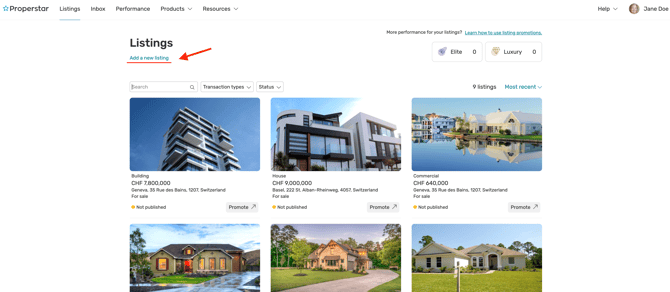
1\. Go to the **Listings** page and click on the Add listing link below the page title
[](https://downloads.intercomcdn.com/i/o/99190598/530f39fbb2eca90f1bc82cbc/Listing+Menu.png)
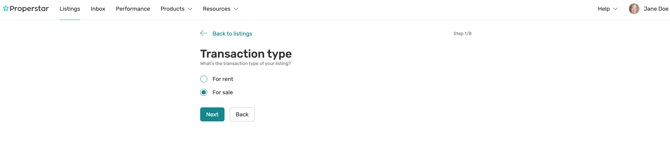
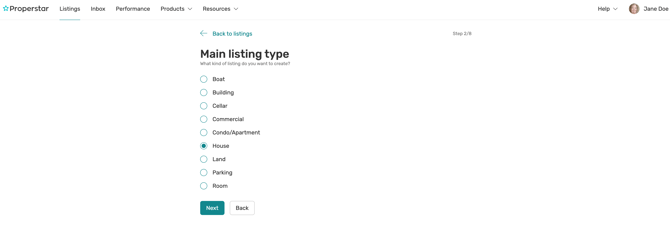
2\. Follow the steps to provide the detailed information about your property - transaction type, listing type, address, price, availability, etc. And don't forget to add the images. After all the steps are through, the listing will be created.
[](https://downloads.intercomcdn.com/i/o/99190819/b0bf3b83bb2633e4474855a6/New+Listing.png)
[](https://downloads.intercomcdn.com/i/o/99192765/c709b4178858d28270b75847/Transaction+type.png)
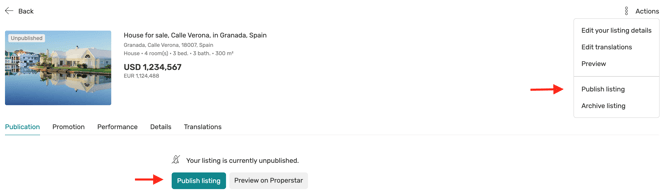
3\. Before publishing you can check how your listing will be looking on Properstar portals, click the **Preview on Properstar** button for this. To publish the listing, just click the **Publish listing** button in the **Publication** tab or open the **Actions** drop-down in the top right corner and click **Publish** **listing**.
If you have any doubt, you can always [contact us](https://dashboard.properstar.com/contact). We will be around if our help is needed.
- [Manage your Properstar Account](https://help.properstar.com/knowledge/manage-your-properstar-account?hsLang=en)
- [Manage your listings](https://help.properstar.com/knowledge/manage-your-listings?hsLang=en#main-content)
- [Listing details](https://help.properstar.com/knowledge/manage-your-listings?hsLang=en#listing-details)
- [Listing publication](https://help.properstar.com/knowledge/manage-your-listings?hsLang=en#listing-publication)
- [Manage your subscription](https://help.properstar.com/knowledge/manage-your-subscription?hsLang=en)
- [Manage your leads](https://help.properstar.com/knowledge/manage-your-leads?hsLang=en)
- [About our products](https://help.properstar.com/knowledge/about-our-products?hsLang=en#main-content)
- [Listing promotions](https://help.properstar.com/knowledge/about-our-products?hsLang=en#listing-promotions)
- [Feed integration](https://help.properstar.com/knowledge/feed-integration?hsLang=en)
- [Contact us](https://help.properstar.com/knowledge/contact-us?hsLang=en)
[](https://www.properstar.com/)
[Terms of use](https://dashboard.properstar.com/terms-of-use)
Copyright © 2025, Properstar SA